Your first program
This program measures a filter by playing sines through it. It needs CPython and the wheel and nothing else.
import array, math, audiobiquad, audiocore

RATE = 48000

def gain_db(freq):
    """Play a sine through a 1 kHz low-pass and report how loud it comes out."""
    sine = array.array("h", (int(16000 * math.sin(2 * math.pi * freq * i / RATE))
                             for i in range(12000)))
    src = audiocore.RawSample(sine, sample_rate=RATE, channel_count=1)
    lp = audiobiquad.Biquad(mode=audiobiquad.LOW_PASS, frequency=1000, Q=0.707,
                            sample_rate=RATE, channel_count=1)
    lp.play(src)
    peaks = [max(map(abs, memoryview(audiocore.get_buffer(lp)[1]).cast("h")))
             for _ in range(40)]
    return 20 * math.log10(max(peaks[20:]) / 16000)   # skip the settling

for f in (100, 1000, 4000, 8000):
    print(f"{f:5d} Hz  {gain_db(f):6.1f} dB")
Saved as first.py and run with python first.py, it prints:
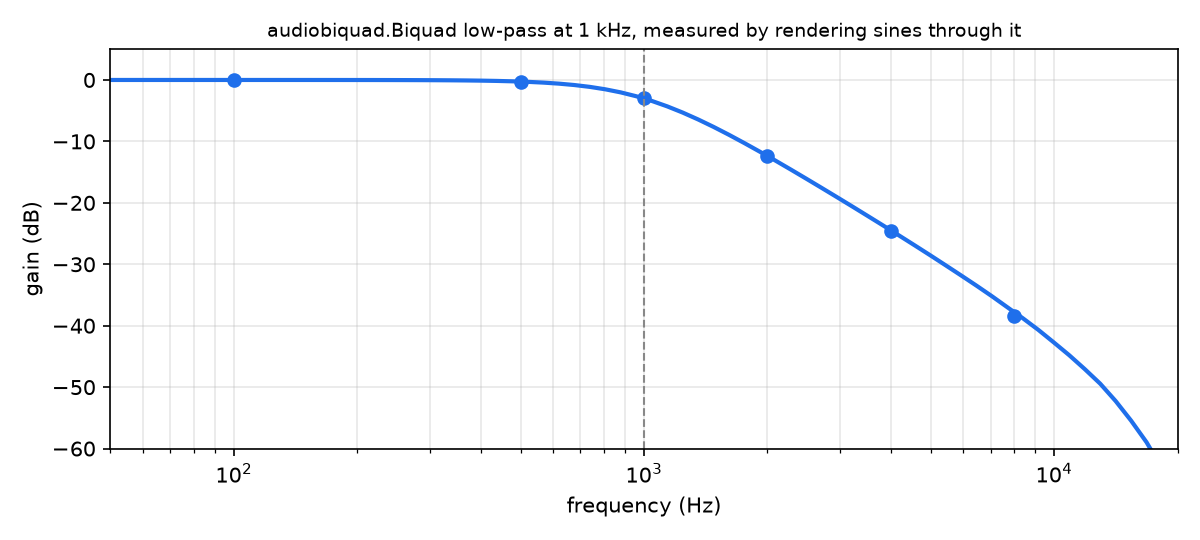
  100 Hz    -0.0 dB
 1000 Hz    -3.0 dB
 4000 Hz   -24.6 dB
 8000 Hz   -38.4 dB
A 1 kHz low-pass lets 100 Hz through untouched, is 3 dB down at the corner, and cuts hard above it. Here is the same measurement at 70 frequencies:
What it does
gain_db builds a quarter second of sine as an array of 16-bit samples and wraps
it in an audiocore.RawSample. It builds an audiobiquad.Biquad, a
low-pass at 1,000 Hz, and play()s the sine into it. A filter is a source:
anything that can be played into something else is an audio sample.
audiocore.get_buffer(lp) asks the filter for its next block, the way a
mixer or an output does. It returns a status and a memoryview of
16-bit samples. The program pulls 40 blocks, keeps each block’s peak, and
ignores the first 20 while the filter settles. The ratio of that peak to the
input’s 16,000 is the gain in decibels.
That pull is the whole design: a source hands out blocks when whatever sits downstream asks for them, so nodes chain without Python touching every sample. How it works has the rest.
Render a synthesizer
The same call works on a synthesizer:
import audiocore
import synthio

synth = synthio.Synthesizer(sample_rate=8_000)
synth.press(69)
status, block = audiocore.get_buffer(synth)
That renders a block from a source; it doesn’t select a speaker. A host can pull the graph for offline rendering, give it to a mixer or a pump, or attach it to a platform-specific audio output.
examples/audiodsp_simpletest.py
takes it to something you can hear: a chord through a low-pass, pulled
block by block into a WAV file. It runs unchanged on MicroPython,
CircuitPython and CPython.
Next
Play computed audio with
audiopump.Ring.Filter a sound with more of
audiobiquad.The modules, one by one.