Palette families
The five palette families get_palette builds, with what each takes and what it holds. Choose a palette says which to use.
Family |
Class |
Key |
Primary Use Case |
|---|---|---|---|
Color Wheel |
|
|
Continuous color ramps, hue sweeps, rainbows, circular gauges |
Material Design |
|
|
Modern UI widget theming, semantic status colors, contrast shades |
Color Cube |
|
|
Quantized 8, 27, 64, or 125 color spaces for dithering and Retro UIs |
Windows-16 |
|
|
Standard named 16-color ANSI/Windows retro palette |
ANSI |
|
|
Terminal colors, numbered as ANSI escape codes number them |
Color Wheel ("wheel")
WheelPalette generates an evenly spaced rainbow ramp by stepping through HSV hues while maintaining constant saturation and value.
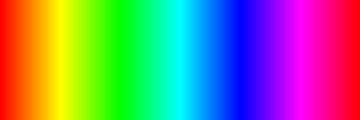
from palettes import get_palette

# 256-step wheel at full saturation
wheel = get_palette("wheel", color_depth=16, length=256, saturation=1.0)

# Access color at index
color_50 = wheel[50]
Parameters
length(int): Number of steps around the hue circle (default256).saturation(float): Color saturation between0.0(grayscale) and1.0(vibrant, default1.0).value(float): Brightness multiplier between0.0and1.0(default1.0). Passingsaturation=Noneandvalue=Nonetogether selects the classic three-segment wheel instead of the HSV ramp.cached(bool): Memoize each computed color (defaultTruefor the wheel and the cube).color_depth(int): Bit depth —4(palette index),8(RGB332),16(RGB565) or24(0xRRGGBB). See Color formats.swapped(bool): IfTrue, swap bytes in 16-bit RGB565 for SPI display hardware.
Material Design ("material_design")
MDPalette provides Google’s Material Design color palette with 19 hue families, each containing shades from 50 (lightest) to 900 (deepest), most also with the accent shades A100, A200, A400 and A700, plus BLACK and WHITE: 256 colors in all.
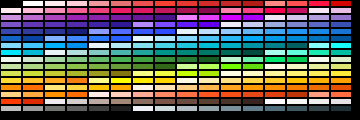
from palettes import get_palette

md = get_palette("material_design", color_depth=16)

# Shades are attributes: <FAMILY>_S<shade>, accents <FAMILY>_A<shade>.
header_bg = md.BLUE_S500  # 0x24BE -- primary brand color
card_bg   = md.BLUE_S50   # 0xE79F -- light tint background
accent_fg = md.BLUE_A400  # 0x2BDF -- vivid accent
Available Color Families
Attribute prefixes: RED, PINK, PURPLE, DEEP_PURPLE, INDIGO, BLUE, LIGHT_BLUE, CYAN, TEAL, GREEN, LIGHT_GREEN, LIME, YELLOW, AMBER, ORANGE, DEEP_ORANGE, BROWN, GREY, BLUE_GREY – each with _S50.._S900 shades; every family but BROWN, GREY and BLUE_GREY also has _A100, _A200, _A400 and _A700 accents. The bare family name (for example md.BLUE) is its 500 shade.
Color Cube ("cube")
CubePalette divides the RGB color space into equal steps along each axis ($N \times N \times N$).
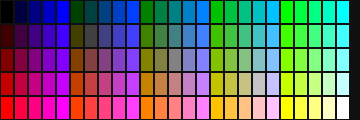
size= is the edge length — the steps per channel — and must be 2 to 5.
The first column is what you pass; the second is what you get.
|
Total Colors |
Steps per Channel (R, G, B) |
Typical Use |
|---|---|---|---|
2 |
8 |
2 steps (0, 255) |
3-bit primary colors |
3 |
27 |
3 steps (0, 128, 255) |
Ultra-compact retro UIs |
4 |
64 |
4 steps (0, 85, 170, 255) |
6-bit color quantization |
5 |
125 |
5 steps (0, 64, 128, 192, 255) |
High-fidelity dithering |
# size is the steps per channel: size=4 -> 4x4x4 = 64 colors
cube = get_palette("cube", color_depth=16, size=4)
Named Windows-16 ("default")
The standard 16-color ANSI/Windows palette accessible by name or integer index.
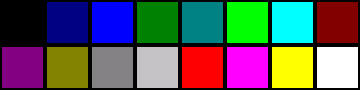
from palettes import get_palette

win16 = get_palette("default", color_depth=16)

black  = win16.BLACK    # 0x0000
red    = win16.RED      # 0xF800
green  = win16.GREEN    # 0x0400
blue   = win16.BLUE     # 0x001F
yellow = win16.YELLOW   # 0xFFE0
white  = win16.WHITE    # 0xFFFF

win16[0]              # integer indexing works too -> 0x0000
win16.color_name(0)   # "Black"
ANSI ("ansi")
AnsiPalette holds the colors a terminal names with escape codes, in the order the codes number them: ESC[31m is index 1, red, and ESC[38;5;208m is index 208. Indices 0 to 15 are black, red, green, yellow, blue, magenta, cyan and white, then the bright eight. The 256-color palette adds the 6x6x6 color cube (16 to 231) and 24 greys (232 to 255). The values are xterm’s defaults.
from palettes import get_palette

ansi = get_palette("ansi", color_depth=24)

ansi.RED                  # 0xcd0000, the same as ansi[1]
ansi.BRIGHT_RED           # 0xff0000, ansi[9]
hex(ansi[208])            # '0xff8700'
ansi.nearest(0xFF8700)    # 208: the closest index to any RGB color
nearest(r, g, b) (or one 0xRRGGBB integer, or a tuple) fits a 24-bit color into one palette index, which is what a terminal does with ESC[38;2;r;g;bm.
Parameters
length(int):16for the ANSI colors alone, or256(default).cached(bool): Memoize each computed color (defaultTrue).color_depth(int): Bit depth, as for the other families.swapped(bool): IfTrue, swap bytes in 16-bit RGB565.