Your first picture
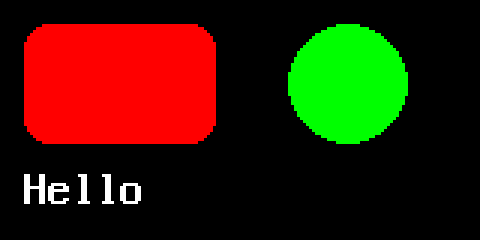
This program draws a card, a dot and a word into memory, tells you which part of the picture changed, and saves it as a BMP file. It needs no screen, so it runs the same on a desktop and on a board.
import pygraphics
from pygraphics import FrameBuffer, RGB565

fb = FrameBuffer(bytearray(160 * 80 * 2), 160, 80, RGB565)
fb.fill(0x0000)
card = fb.round_rect(8, 8, 64, 40, 8, 0xF800, f=True)
dot = fb.circle(116, 28, 20, 0x07E0, f=True)
label = pygraphics.text16(fb, "Hello", 8, 56, 0xFFFF)
print("changed:", card + dot + label)
fb.save("hello.bmp")
It prints:
changed: Area(8, 8, 128, 64)
and hello.bmp looks like this, shown here at three times its size:
What each line does
FrameBuffer(bytearray(160 * 80 * 2), 160, 80, RGB565) makes a picture 160
pixels wide and 80 high. RGB565 stores each pixel in two bytes, which is
why the buffer is 160 * 80 * 2 bytes long. It’s the format most small
colour screens take directly.
Colours are 16-bit RGB565 numbers: 0xF800 is red, 0x07E0 green, 0x001F
blue, 0xFFFF white and 0x0000 black.
round_rect(x, y, w, h, r, c, f=True) draws a rectangle with corners of
radius r, filled because of f=True. circle(x, y, r, c, f=True) draws a
filled circle centred on x, y. text16 writes text in the built-in font
that is 8 pixels wide and 16 high.
Each of these calls returns an Area, the rectangle of pixels it changed.
Adding two areas gives the smallest rectangle that covers both, so
card + dot + label is everything this program drew. On a real screen you’d
send just that rectangle; Update part of a screen
shows how.
fb.save("hello.bmp") writes the picture out. The file type comes from the
pixel format; Load and save images has
the others.
Try it in your browser
This version draws onto the canvas beside the editor. Change a number and press Run.
Next: draw shapes.